
Official manual · online edition
HDfury VRROOM user manual, readable online
The complete official 8K VRROOM User Manual (Rev 1.00) as easy-to-read web pages. The text and images are reproduced unchanged from the original document — click or tap any image to enlarge it. Prefer paper or offline reading? Get the original PDF from the downloads page.
VRROOM Overview
Team HDfury would like to thank you personally for purchasing the 8K VRROOM!
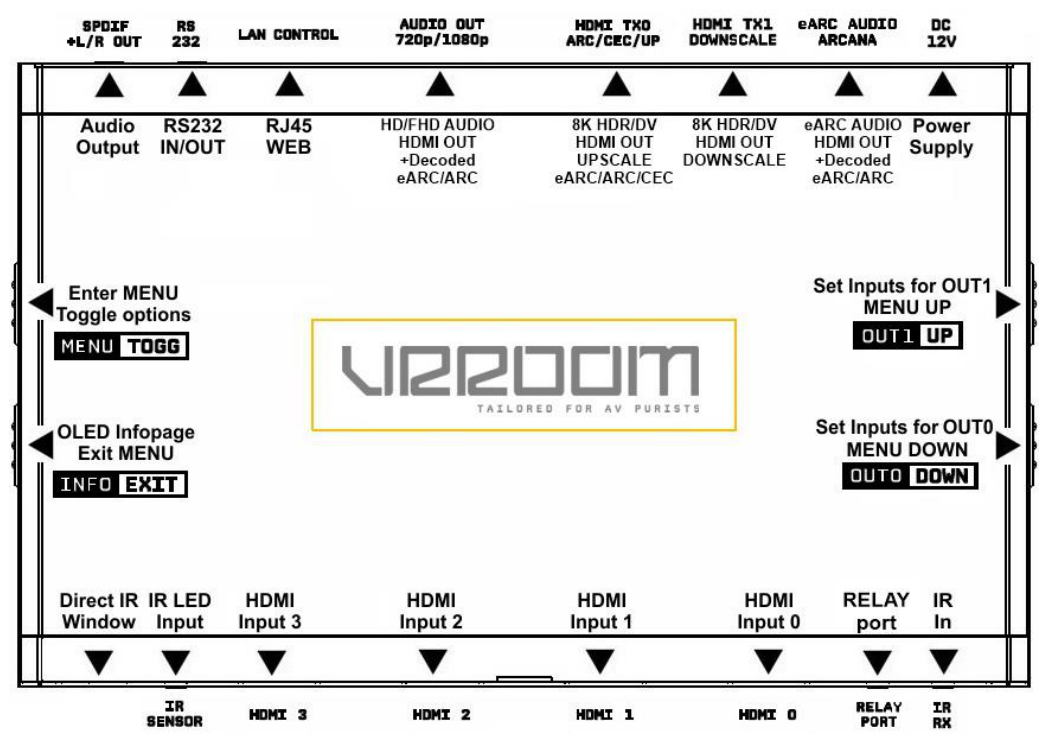
This unique HDMI2.1 device supports up to 4 inputs for true Full UHD 8K60/4K120 VRR FRL5 1200MHz 40Gbps bandwidth signals. It will allow you to solve any HDCP error, passthru and split while extracting full HDMI audio from HDMI sources and ARC/eARC up to Atmos HBR over TrueHD from ARC and eARC TVs to feed older AVR via HDMI input or any eARC/ARC sound system via HDMI output. Matrix any SD/HD/FHD/UHD/HDR/DV or PC signals up to 600MHz. Upscale to 4K/8K or downscale to 4K/1080p each output individually and display relevant information on OLED/OSD/WebServer. Wide selection of EDID banks can be set for each input. LLDV>HDR, Inject, replace or translate HDR metadata and AVI infoframe. It is also capable of auto switching any sources including X1X, ATV4K, Shield, etc… Based on incoming content type it can send relevant RS232 commands to any RS232 controllable display. Relay port offers automation capability. All controls can be completed with IR codes, push buttons on the unit, via IP/HTTP/RS232 (MAC/WIN/Linux) or through embedded Webserver available for any web browser based device such as MAC/WIN/Linux computer or Android/iOS phones, tablets and others. Android and iOS APP are also available for direct control on the same network.
Disclaimer: 3rd party and/or custom firmware providing extra features are not covered in this manual.
Table of content
The manual is split into the chapters below, in the same order as the original document. Page numbers refer to the official PDF.
- Connecting Cables, Jack and AUDIO/CEC/ARC/eARC connections PDF p. 7, 13–14
- Power/Status OLED and the four buttons PDF p. 8–12
- VRROOM OLED Menu PDF p. 15–16
- Accessing the Web Server, Top and INFO sections PDF p. 17–19
- Web Server EDID Section and the list of Custom EDID PDF p. 20–24
- Web Server HDR/AVI Section PDF p. 25–28
- DV Section of the Webserver PDF p. 29–30
- Web Server OSD Section PDF p. 31–32
- Web Server CEC/eARC and MACROS Sections PDF p. 33–35
- Web Server CONFIG Section PDF p. 36–39
- Firmware update, CONFIG export, RS232/IP and IR codes PDF p. 40–49
- FAQ — general, CEC/ARC, ATV4K, LLDV>HDR10, SONOS Arc, Shield, audio, video PDF p. 50–65
- Highlight features, specifications, certifications and Pro Tips PDF p. 66–75
Most popular
Dolby Vision on HDR10-only projectors & TVs
VRROOM presents a Dolby Vision EDID to your player (Apple TV 4K, Shield, Oppo, Panasonic, Kaleidescape…), so it outputs LLDV — tone-mapped per scene — which VRROOM hands to your projector or TV as a signal it already accepts. JVC, Sony and Epson owners describe it as a big step up from static HDR10.
LLDV setup guide + projector & TV list →In a hurry?
The condensed manual guide covers the buttons, OLED menu, web server and firmware updates on a single page, and the troubleshooting section solves the most common problems step by step.