
Official manual · chapter 8
VRROOM Web Server OSD Section (NOT YET AVAILABLE)
Original text and images from the official 8K VRROOM User Manual (Rev 1.00), pages 31–32. The manual notes this section as not yet available at Rev 1.00.
The OSD section
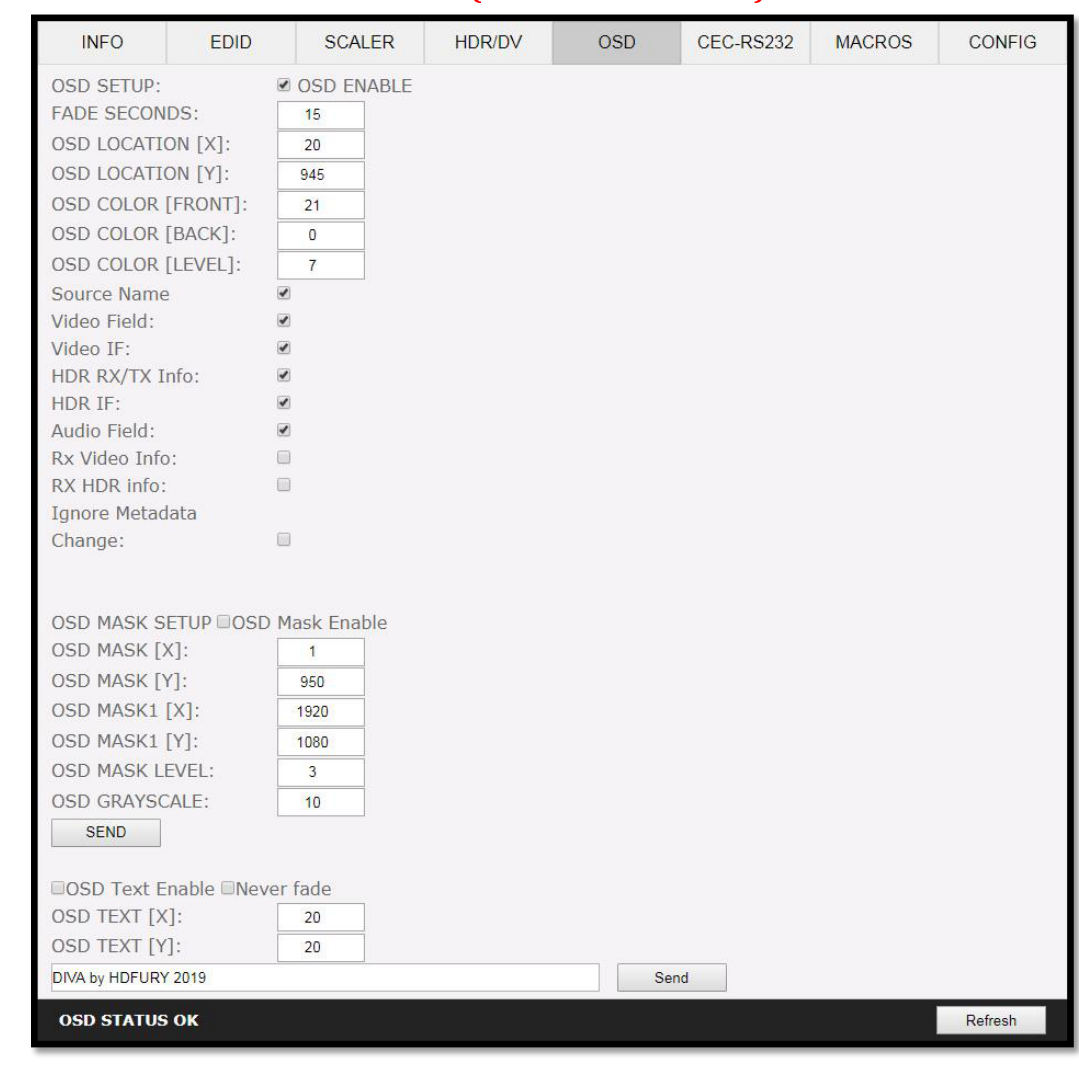
[OSD SETUP]: Enable or Disable the OSD feature of VRROOM.
[OSD FADE]: Set the timer in seconds before OSD fade out, 0 = never (always ON)
[OSD LOCATION X, Y]: Set the X and Y value of the OSD location at 1080p, values are multiplied by 2 when the stream is 4K.
[OSD COLOR FRONT, BACK, LEVEL]: Set the Text Color [FRONT 0-31], Background Color [BACK 0-31] and Background transparency [LEVEL 0-7] for the OSD.
[OSD INFO]: Select or unselect the information that must be displayed on your VRROOM OSD. Available options are: Source name, Video Field, Video IF, HDR info, HDR IF, Audio field, RX Video info, RX HDR info, Ignore Metadata Change.
[OSD MASK SETUP]: Enable of Disable the use of OSD Mask.
[MASK LOCATION x0,y0,x1,y1]: Defines the coordinates of the top left and bottom right corner of your OSD Mask at 1080p. Values are multiplied by 2 when the stream is 4K
[OSD MASK LEVEL]: Select the level of transparency for your OSD Mask. Value range is from 1 to 7.
[OSD GRAYSCALE]: Select the level of grayscale for your OSD Mask. Value range is from 0 to 15.
[SEND]: For any changes in the above parameters, click SEND to upload them to your VRROOM unit.
[OSD TEXT ENABLE]: Enable or disable the OSD Custom Text, once activated, the custom text defined in the text field will be displayed on screen.
[NEVER FADE]: If you want to keep the OSD Custom text even after OSD info faded away, make sure this option is enabled.
[OSD TEXT X,Y]: Set the X and Y value of the OSD Custom Text at 1080p, values are multiplied by 2 when the stream is 4K
[SEND]: For any changes in the above parameters, click SEND to upload them to your VRROOM unit.
[REFRESH]: Refresh the current page.